
Step-by-Step Guide: How to Retrieve Renewed PTC Floating Licence for Mathcad and Creo
Retrieving PTC Creo and Mathcad floating licences involves following specific steps based on your licencing setup. Here is a step-by-step guide that shows the exact steps to guarantee seamless retrieval of your renewed floating licence with clear instructions and best practices, no matter your level of experience.
Here is a simple guide to help you retrieve your renewed PTC Mathcad and Creo floating licences in nine easy steps!
Step 1: Access the PTC main website by opening this link: https://www.ptc.com/en/support
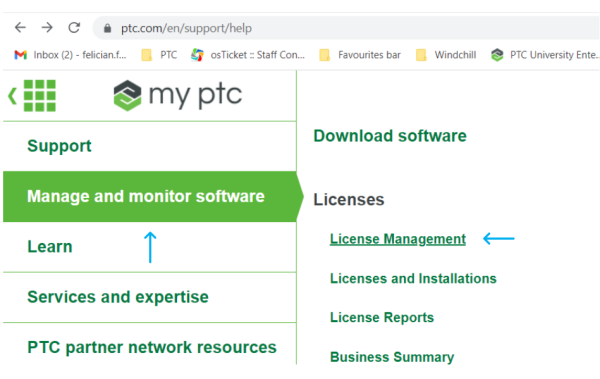
Step 2: On the top left, click on the green grids on a white background.

Select “Manage and monitor software” and click on “Licence Management.”
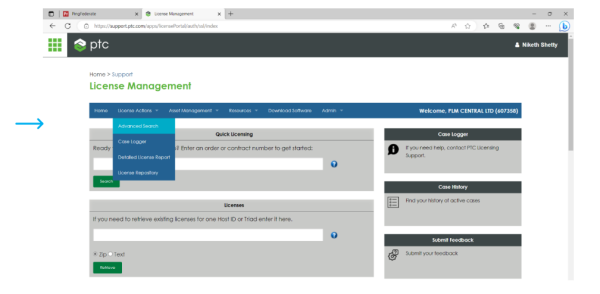
Step 3: Scroll to “Advanced Search.”
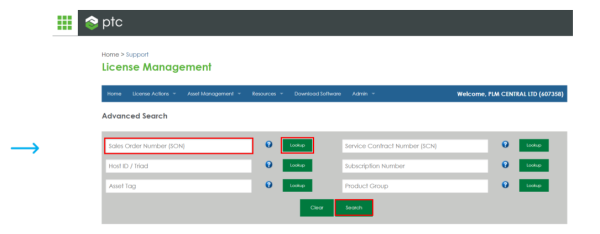
Step 4: In the window that appears, enter your SON (sales order Number) and click “Lookup”,
Select and click “Search.”
Step 5: On the list below, select the licence you need and “Tick.”
You use the (+) sign to extend the list further, with the extensions included.
Next, you need to click “Retrieve Licence” in the right box.

Step 6: On the list below, select the licence you need and “Tick.”
In the next step, choose the format you prefer: “text” or “zip file.”
Step 7: After this step, you will receive an email with a licence file (a zip or text file).
You need to download it to unzip it. There are two files; use the one without “Standard” and
rename to licence.dat.
Step 8: Next, you need to go to the location where your licence server is installed.
Either on your local computer or on the server.
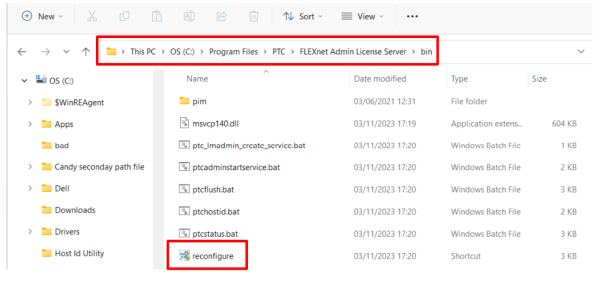
Find this location: C:\Program Files\PTC\FLEXnet Admin License Server\bin and reconfigure your licence by running Reconfigure.exe (right-click and run as administrator.)
Step 9: In the source field, remove the old license file (use the “-” sign), then place your new licence; the
file, which you have received, by dragging it in or using the (+) ‘plus sign’ to browse the file.
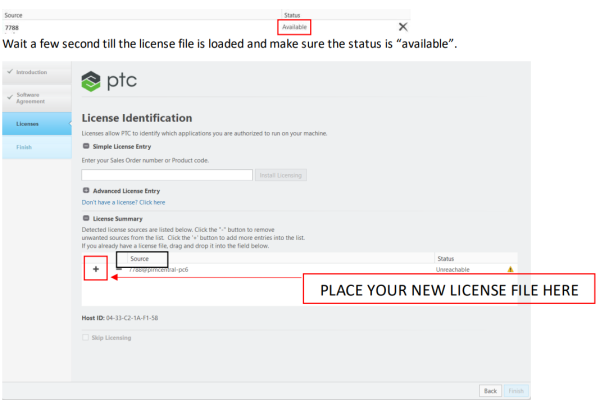
At the end, click “Finish” to complete your installation.
We partner with


Contact
+44 (0)1923586270